Contents
Tokdash is a local dashboard for AI coding agents: it reads the session logs Codex, Claude Code, Gemini CLI, OpenCode, Kimi, Pi and friends already write to disk, and turns them into tokens, USD cost, cache-hit rate, and subscription quota — all on 127.0.0.1, no account, no upload. Two earlier posts cover the dashboard itself (v1.0 lifecycle) and the quota tab (one dashboard for every agent).
The problem with a dashboard is that you have to open it. This post is about the two things that fix that.
Tokdash Companion, now on macOS and Windows
Tokdash Companion 0.2.0 is a native status bar client for the Tokdash service — SwiftUI MenuBarExtra on macOS, C#/WPF in the Windows notification area. No Electron, no webview. It reads the same local HTTP API the dashboard uses and renders one panel.
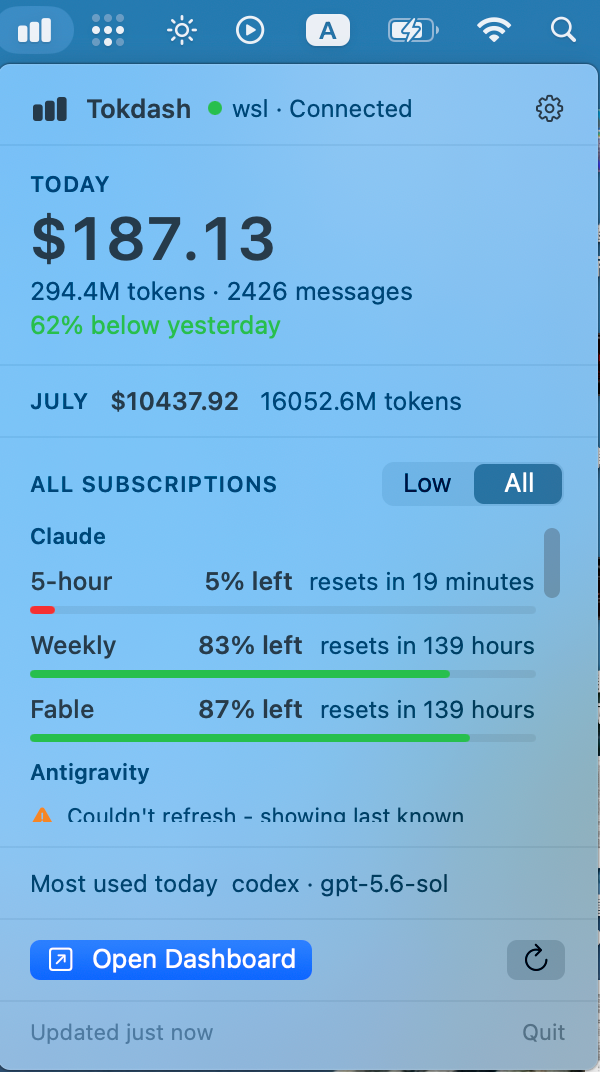
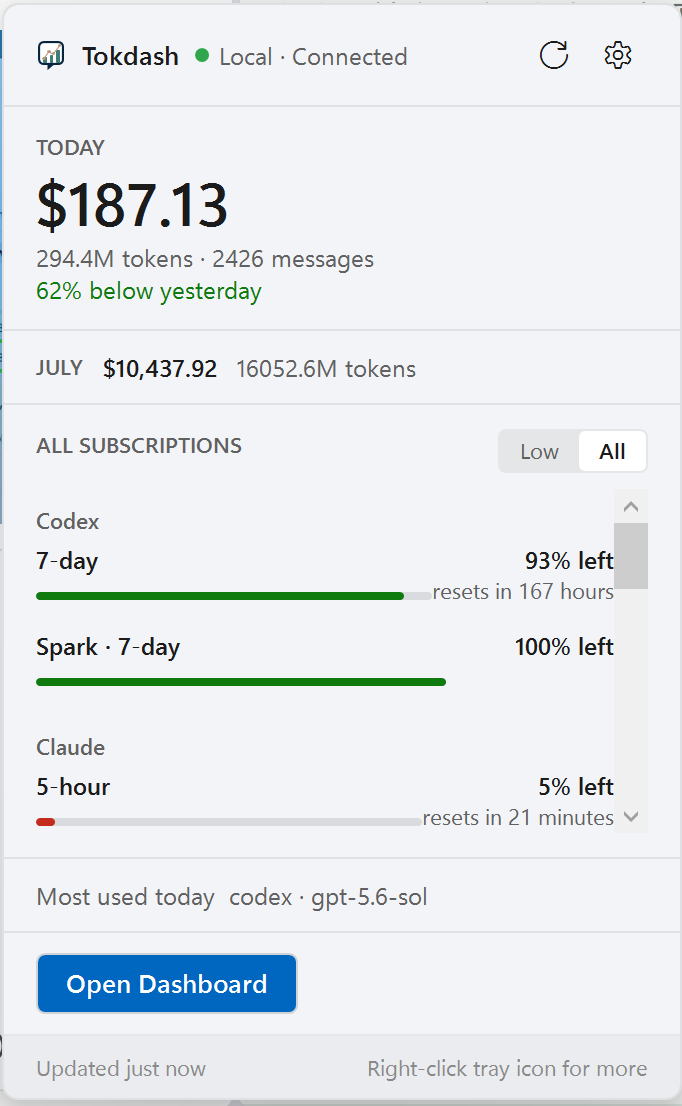
macOS menu bar (left) and Windows notification area (right)
Top to bottom: today’s cost, tokens, and message count, with a comparison against yesterday; month-to-date; then subscription quota grouped by provider — Codex, Claude, Kimi, MiniMax, Antigravity, Grok — each window showing percent left and a relative reset time. The Low / All toggle collapses the list to just the windows that are actually running out, which on a busy day is the only row you want. At the bottom, the heaviest tool and model today, and a button that opens the full dashboard.
New in 0.2.0, matching the multi-server support that landed in Tokdash 1.6.0: point the companion at several Tokdash endpoints — a WSL box, a MacBook, a machine on your tailnet — and it refreshes them in parallel, combines the usage totals, and keeps quota grouped per server. If one endpoint is down the rest still render, with the failure marked instead of the whole panel going blank. Low-quota notifications and launch at login are opt-in and off by default.
What it does not do: no telemetry, no credential discovery, no port scanning, no log parsing of its own. It talks only to the Tokdash endpoints you configure (and, if you ask it to check for updates, GitHub’s public releases API).
Getting it
Install and start Tokdash 1.5.2 or newer first — pipx install tokdash && tokdash setup — then grab the asset for your platform from the companion release:
| Platform | Asset | Requirements |
|---|---|---|
| macOS | Universal DMG (arm64 + x86_64) |
macOS 14+ |
| Windows | Self-contained portable ZIP (x64) |
Windows 11 (Arm via x64 emulation) |
These binaries are unsigned previews. Gatekeeper and SmartScreen will both warn you about an unknown publisher. Verify the downloads against the release’s SHA256SUMS, download only from the repository, and continue only if you trust it. Signing and notarization are on the list for a later release. Install, update, and removal steps are in the companion release guide.
The statusline, for when you never leave the terminal
The companion is for peripheral vision. The statusline integration is for the feedback loop — today’s spend printed under every Claude Code prompt, ticking while you work.

Everything except the 📊 segment is Claude Code’s own session data; Tokdash contributes the spend. Three drop-in templates ship in the repo:
statusline-minimal.sh— one line:[Claude Sonnet 4.6] 📁 myproject | 📊 12.3M ($4.56) today. Switch the window withTOKDASH_STATUSLINE_PERIOD(today,week,month,year, …).statusline-full.sh— four rows: context bar, session cost, today and week totals, git, rate limits, top-3 tools. The Tokdash parts sit between marked block comments so you can delete them.statusline.ps1— the minimal one-liner for Claude Code running natively on Windows. PowerShell 5.1+, nothing to install.
Install is a copy plus a settings block:
1
2
3
mkdir -p ~/.claude/scripts
cp statusline-minimal.sh ~/.claude/scripts/statusline.sh
chmod +x ~/.claude/scripts/statusline.sh
1
2
3
4
5
6
7
8
// ~/.claude/settings.json
{
  "statusLine": {
    "type": "command",
    "command": "bash ~/.claude/scripts/statusline.sh",
    "refreshInterval": 30
  }
}
refreshInterval (Claude Code 2.1.97+) re-runs the script every 30 seconds, so the numbers move even while you sit and read. Every call is a plain GET against loopback, so Tokdash’s write-protection gate never blocks it, and it fails silently — if Tokdash isn’t running the 📊 segment just disappears instead of breaking your prompt. Any agent that can run curl and print the result can do the same thing; the API reference is in docs/reference/API.md.
Which one you want
Roughly: the statusline while you are typing, the companion while you are not, the dashboard when you want to know why last week cost what it did.
- Live demo (no install): tokdash.github.io/demo
- Project home: tokdash.github.io
- Repo: github.com/JingbiaoMei/Tokdash
- Companion download: companion-v0.2.0 release
- Statusline templates:
docs/guides/statusline - Latest dashboard release: Tokdash v1.6.4 —
pipx install tokdash
Bugs, missing metrics, or a provider whose quota you want tracked: open an issue. Signed companion builds are the next thing I want to ship.
Jingbiao Mei is a final-year PhD student at the University of Cambridge’s Machine Intelligence Lab, working on multimodal retrieval, agent systems, and the kind of tool-usage problems that only show up after the third coding agent is on the machine at the same time. He is the creator of Tokdash, ATM-Bench, FLMR, PreFLMR, and ExPO-HM.

Comments