Contents
In front of my computer I write code in a terminal. It’s fast, it’s close to the keys, and I have no interest in switching.
But there are three things a CLI is genuinely bad at, and every one of them has cost me hours.
Sending it a picture. An error screenshot, a design mock, a photo of a whiteboard — to let the agent see it I have to save a file, remember where I saved it, and type the path in. The filename is Screenshot 2026-08-13 at 14.32.11.png, with spaces, so completion fails and I quote it and try again. Half a minute for something I could have explained by pointing.
Running several at once. One terminal refactoring, one running tests, a third tab with yesterday’s unfinished thing. Every few minutes I cycle through all of them to see which finished and which is sitting on a confirmation prompt. By the time I reach the third, the first has been waiting five minutes.
Walking away. This is the expensive one. The agent is still running when I leave. I come back to find it stopped three minutes in to ask can I run this command?, and then idled for two hours.
The first two are what GUIs are good at. The third is what phones are good at. The problem is that a GUI and a phone normally have nothing to do with the session running in my terminal.
cosyncing is what I built to close that gap. Same session, more screens.
Left: the real Flutter client. Right: a Codex CLI view of the same session. The terminal runs a turn and the app follows live; a prompt typed in the app appears in the terminal; a permission request raised by the agent is answered in the app.
That recording is the actual client against an actual broker — the app’s enrolment, live-follow, composer send, and the Allow-once click are all genuinely performed. Only the right-hand terminal pane is scripted, driven in lockstep with what the app really shows.
What it is
A broker installs on the machine where your agents already run. It watches their sessions and serves a client that shows each one — grouped by project, with its transcript, diffs, commands, and any prompt waiting on you. You read a session, answer the prompt, or take over and drive it.
The web client is served by your own broker at /cosy/. There are Android and desktop builds too, and they all speak to the same broker.
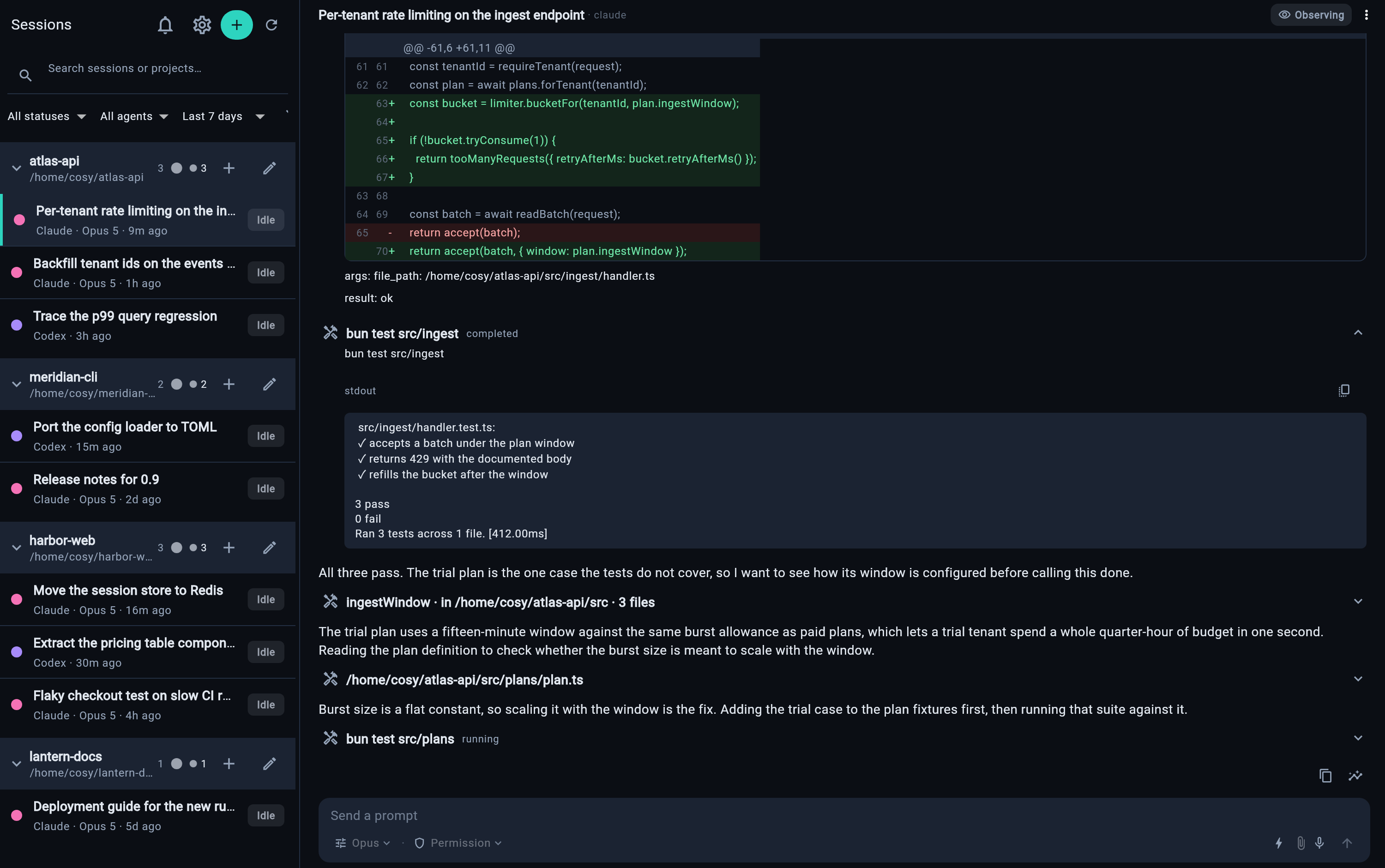
The landscape workspace: roster on the left, the live session on the right.
The key design decision is that there is no primary and no secondary. The broker attaches directly to the agent’s session, and the terminal and the app are both just clients of it. That’s what makes the sync symmetric rather than a remote view of somebody else’s screen.
The three things
Attachments
Drag an image onto the composer and it goes to the agent. Paste a screenshot with Ctrl+V and the same thing happens. No file, no path, no quoting. Uploads are chunked and staged by the broker outside the workspace; completion returns an opaque reference that gets bound to your credential, the tool, the session, and the message identity before any adapter can resolve it to a path.
Drag-and-drop and paste are desktop and web client capabilities.
Every session in one list
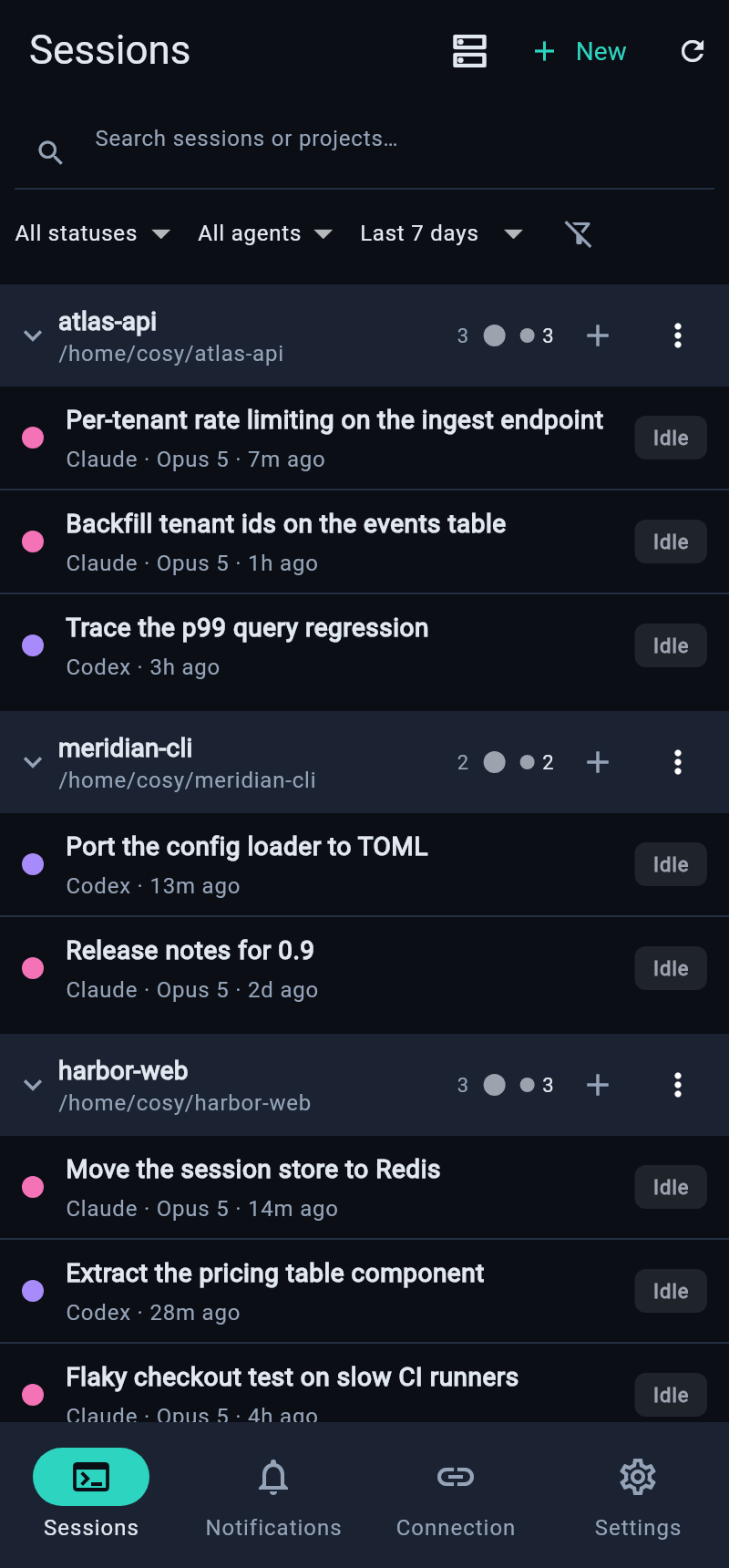
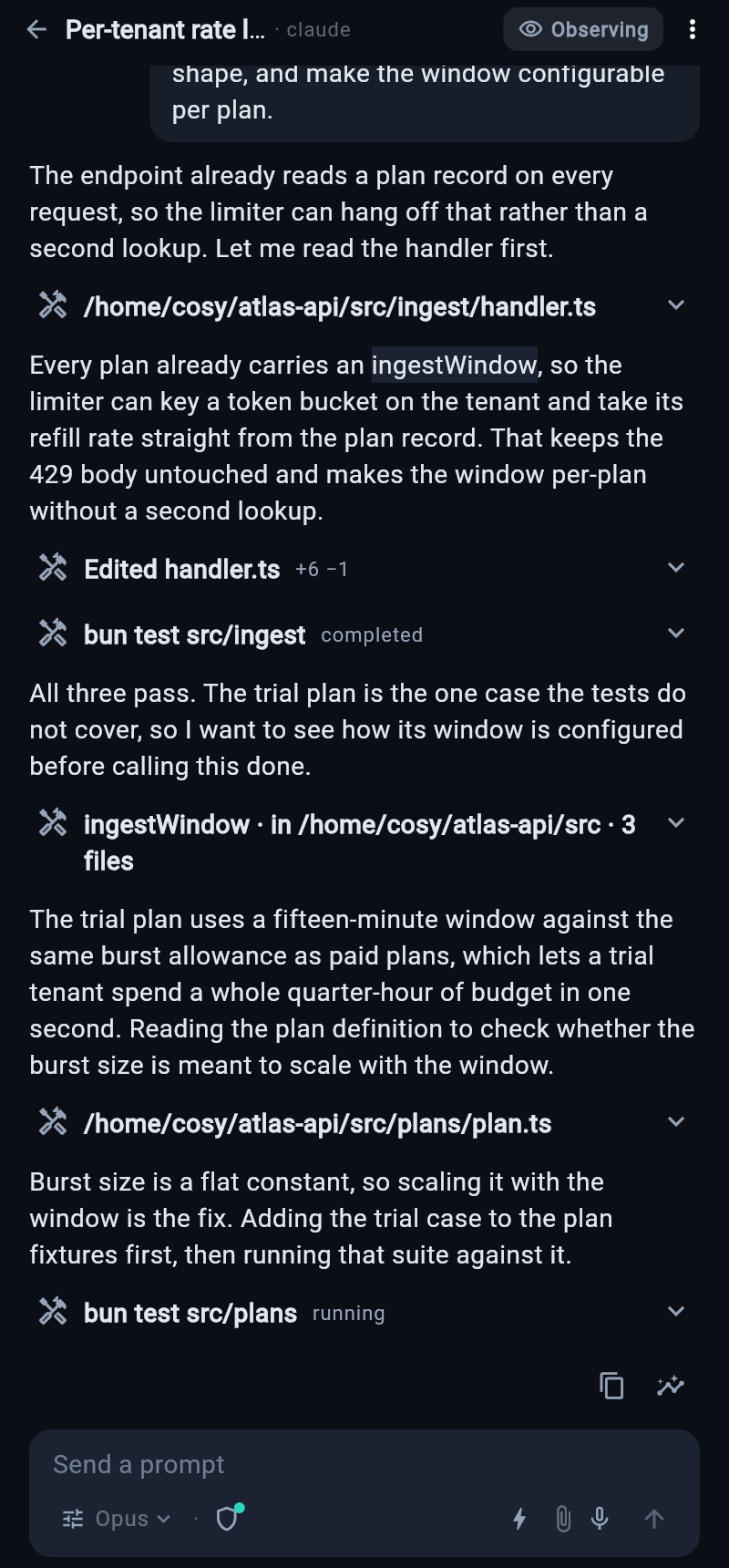
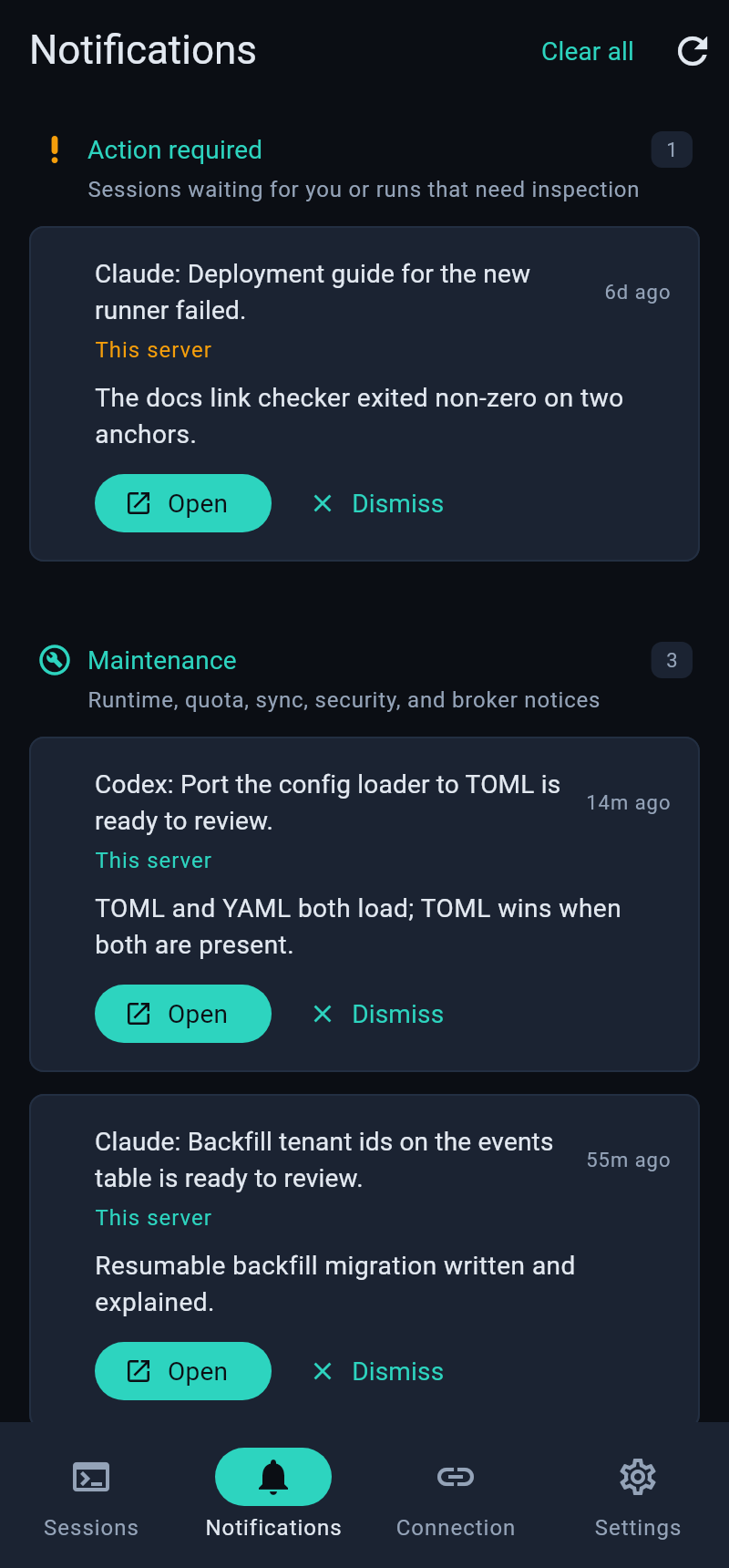
Sessions grouped by project · the transcript · the attention inbox
Sessions grouped by project, each with live status. Which are running, which finished, which are blocked on you — one screen instead of cycling terminal tabs. The attention inbox on the right collects only the sessions currently waiting for an answer, and it’s the screen I actually use most.
The permission card
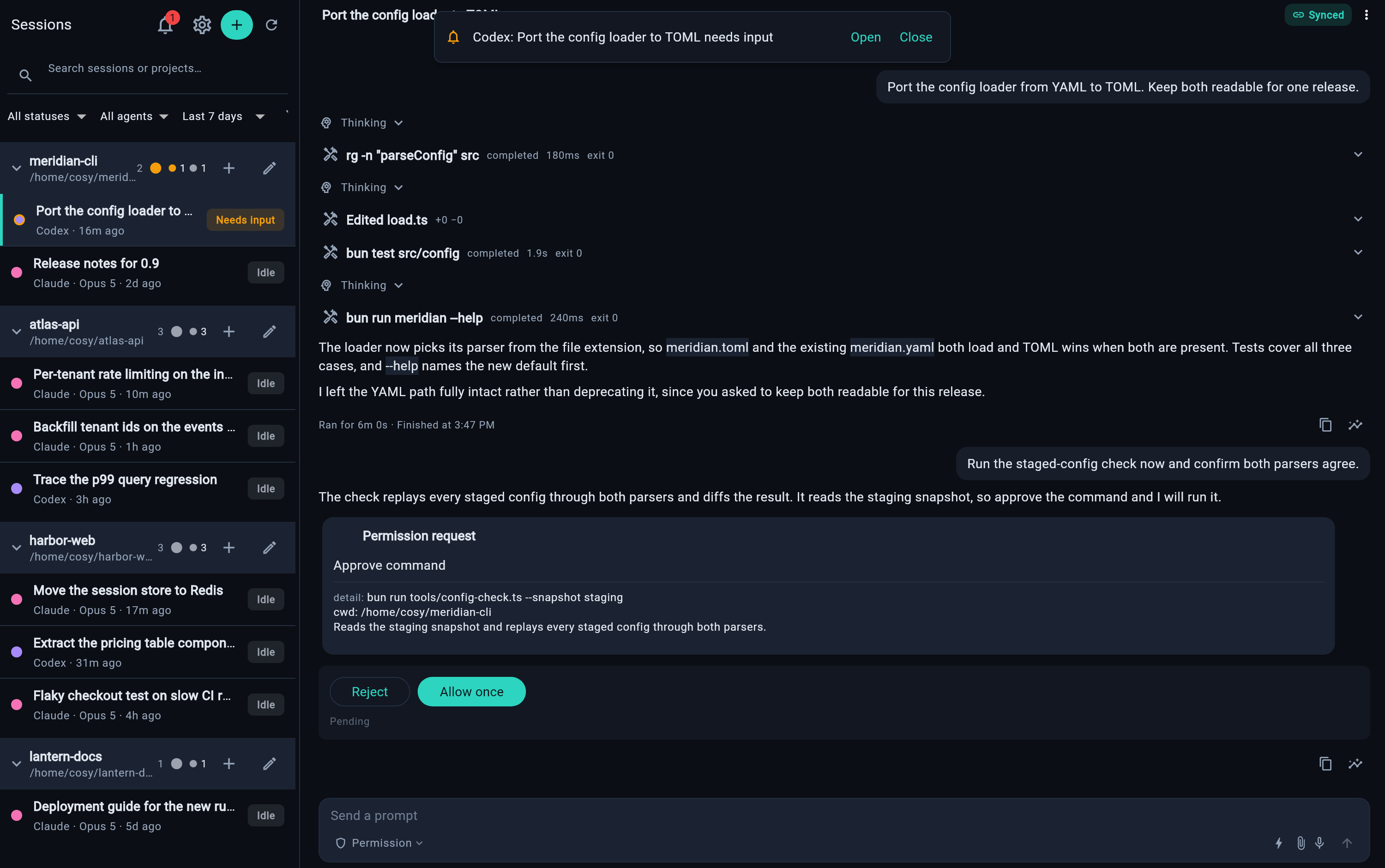
An agent asking can I run this? is the moment the whole run stops. Now that question reaches whatever screen I’m near. Tapping Allow from the sofa starts the command on the machine in the study.
Worth being clear about what is and isn’t happening here: the work stays on your machine. Nothing syncs your code to a cloud and nothing runs a model on your phone. Your project, your environment, your dependencies never move — the phone is one more screen onto a session that lives where it always did. Which is also why battery, heat, and mobile data are non-issues; the phone sends a few sentences.
Agents
Claude Code, Codex, OpenCode, and Pi are registered through one shared adapter contract. Capabilities differ per agent, and the broker reports what a session actually supports instead of the client guessing.
| Agent | Behavior |
|---|---|
| Codex | Full two-way sync. The session opens already synced — no take-over step, no read-only/read-write mode toggle |
| Claude Code | Opens read-only. Tap take over to send messages |
| OpenCode | Supported |
| Pi | Supported |
The Claude Code restriction is a consequence of how its session data is available, not a policy choice on my end. The client surfaces these differences rather than making you discover them.
Privacy
The broker runs on your machine under your account. Broker state is stored there, and session content goes only to authenticated clients over the network you choose. I operate no hosted service in that connection path, and there is no analytics or advertising telemetry. Optional features contact only the services they name — Tailscale Serve, local Tokdash quota data.
Pairing is a five-minute, one-use QR code; paired devices get per-device credentials after that. cosy devices list shows them and cosy devices revoke <id> removes one. The raw broker token remains a full-authority bootstrap credential and is documented as such.
Cross-device use runs over Tailscale, on both the server and the client. This is a real dependency rather than an optional extra — I did not want to build NAT traversal, run a relay, or tell anyone to expose a port. Coffee shop wifi, mobile data, and trains all work; a bad signal just makes it slower. Planes without wifi are still hopeless.
Install
The npm package contains one JavaScript application bundle and the web client. The server needs Bun 1.3.8 or newer to run it, and Node/npm to install and update it.
1
npm install --global cosyncing
Open a new login shell, then:
1
2
3
4
5
6
cosyncing setup

# cosy is the shorthand after setup
cosy pair      # five-minute, one-use QR code
cosy doctor    # diagnoses without changing anything
cosy status
setup inspects the machine, shows exactly what it will change, and applies the whole plan or none of it. It copies the broker to ~/.cosyncing/bin/cosyncing, installs a user service that runs that copy with your Bun, and prints your broker URL. The broker refuses to start until setup has committed.
Updates are package-manager-owned. npm replaces the global package, then cosy setup reconciles the installed service. The broker does not silently replace itself.
| Supported | |
|---|---|
| Broker hosts | Linux x64, Linux arm64, Apple Silicon macOS |
| Windows | Run the broker inside WSL — install Tailscale inside WSL too, since Windows-host Tailscale cannot proxy WSL loopback |
| Clients | Web (served by your broker), Android, Linux, macOS, Windows |
Client builds are on GitHub Releases.
Limitations
Stated plainly, because you’ll find them anyway:
- It’s 0.2.0, and it has been used seriously by one person, who is me.
- Native Windows broker hosting isn’t there. WSL is the supported path.
- The macOS and Windows client builds are unsigned. Gatekeeper and SmartScreen will both object.
- No iOS build yet — it’ll go through TestFlight later. In the meantime an iPad works fine through Safari, since the web client is served by your own broker and needs nothing installed.
- No compiled native broker release. The embedded Bun runtime’s distribution obligations need a recorded resolution first, and that gate stays closed until then.
Under the hood
One monorepo: the TypeScript broker, wire contract, agent adapters, transport and crypto; the Dart client contract, transport, Flutter adapter and crypto; and the Flutter application with every platform runner, test suite, and integration driver.
The client contract is broker-owned and generated — CI runs contract:check and fails on a stale snapshot, so the client can’t drift from what the broker actually serves. The deterministic broker aggregate currently holds 66 registered sub-suites.
The piece that caused me the most grief, if you want one war story: the broker keeps a session’s live owner — active turn, held approval, durable composer draft — after the last client disconnects, and folds later attaches onto it for an idle timeout. That’s correct behavior for a phone that drops off the network mid-turn. It is also why an unanswered permission card greets your next visit as stale UI, and why the fresh attach may never re-resume on the agent daemon. Getting that lifecycle right took longer than the entire sync path.
First-party source is Apache-2.0.
- Source: github.com/cosyncing/cosyncing
- Site and demo: cosyncing.com
- Docs: installation, supported agents, adapter capability matrix
Usage questions go to GitHub Discussions, reproducible defects to Issues. I’d rather hear what breaks than what’s nice.

Comments